📍 Live Bird Reports
 Live Nature Maps™
Get a Live Map for Your County
Live Nature Maps™
Get a Live Map for Your County
Recent Local Reports
Live Birding Reports
The map shows 'live' birding reports submitted by other birders while in the field. Reports can be submitted on the Essex Species screen by clicking on 'Report Sighting' underneath the picture of selected species. The map is refreshed overnight and starts empty each day. To view the species reported on previous days, go to the Historical Bird Map page.
Colour Coding of Markers
Viewing a Report
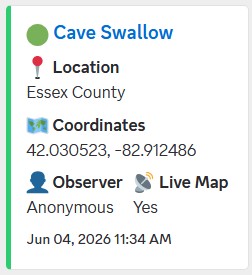
Tap any coloured marker on the map to view details about the sighting.

The popup displays:
- 🐦 Species name
- 👤 Person who reported the bird (if supplied)
- 📅 Date and time reported
- 📍 Copy Coordinates button (can paste into maps app)
- 🌎 Exact coordinates of the sighting
Bird Reporting Areas
Click on the ''Reporting Areas'' button to see the boundaries where bird reports can be sent to the map. The app is currently in beta testing, these areas will increase in number and size as the app reaches full release.
Go To Specific Report
The 'Jump to active alert...' dropdown allows you to select and zoom directly to a specific bird being reported.
Full List of Reports
Just below the map you can scroll through a text list of all currently active live bird reports.
🔔 Rare Bird Alerts
Browser Notifications
Receive instant rare bird alerts on this device.
Discord Community
Receive instant rare bird alerts, discuss sightings with other birders, and stay informed about notable reports across Essex County.
 Live Nature Maps™, the Live Nature Maps logo,
and related branding are proprietary to
McAllister Studio. All rights reserved.
Live Nature Maps™, the Live Nature Maps logo,
and related branding are proprietary to
McAllister Studio. All rights reserved.